Fastify + React
Get your first full stack agent running in 5 minutes. React + Fastify, powered by Vite.
Quickstart
The fastest way to get started with cascaide-ts.
Use the set up command
Run the CLI to scaffold your project automatically.
npx create-cascaide-app@latestFollow the setup guide
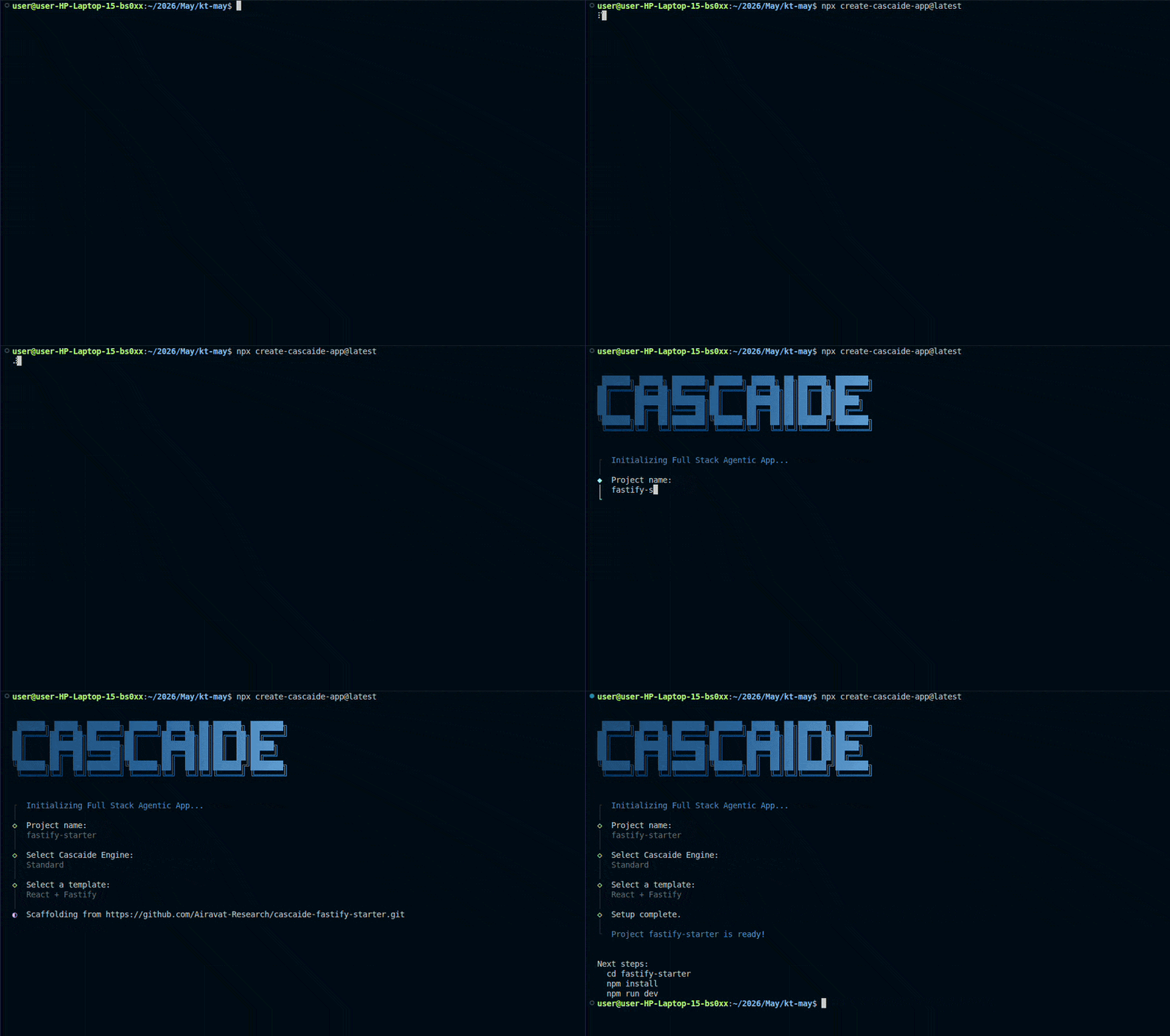
- Select Cascaide Engine (Standard vs Lite)
- Select Fastify + React
Setup the persistence DB
The starters ship with a PG Lite persistence DB, you do not need to do anything in development. Please refer to the database guide for more information.
Ignore this step if you are using cascaide-lite.
Follow the guide here.
Set the environment Variables
GEMINI_API_KEY='your-api-key'
DATABASE_URL='your-db-url' (For dev skip this variable, local pg-lite will be used)
TAVILY_API_KEY='your-key'
Get gemini api key here Get tavily api key here
Install and Run
Open localhost:5173 to use the app!
npm install
npm run dev
Setting Up In An Existing Project
This is how you manually set up cascaide-ts. Both versions are explained below. This agent requires Tavily API Key for the search.
We will be creating a full ReAct search agent with a chat interface. Look at tutorials for a more in depth guide on building agents.
Installation
To set up the whole app we need
core: the core enginereact: react adapter for hooks, provider and rendererpostgres-js: adapter for persistenceserver-fastify: adapter for Fastify specificshelpers: provides helper functions to create agents quickly and llm provider adapters
All of this combined allows you to build full stack agents with UI, at ~45kb gzipped.
Backend
npm i @cascaide-ts/core @cascaide-ts/postgres-js @cascaide-ts/server-fastify @cascaide-ts/helpersIn addition we will also use tavily/core for the search tool.
npm i @tavily/coreFrontend
npm i @cascaide-ts/core @cascaide-ts/reactAgent Set Up
import { tavily } from '@tavily/core';
import { createReactAgent } from '@cascaide-ts/helpers';

const tvly = tavily({ apiKey: process.env.TAVILY_API_KEY });

const SYSTEM_PROMPT = `
You are an expert technical AI assistant equipped with web search capabilities.
You have access to the following tools:
1. search_tool
   Use for general web searches, finding documentation, or retrieving facts.
   Pass a clear, concise query.
`.trim();

export const nodes = {
  ...createReactAgent('search', {
    provider:     'gemini-genai',
    model:        'gemini-3-flash-preview',
    systemPrompt: SYSTEM_PROMPT,
    isStreaming:  true,
    env:          'server',
    tools: [
      {
        name:        'search_tool',
        description: 'Searches the web using the input query.',
        parameters: {
          type: 'object' as const,
          properties: {
            query: { type: 'string', description: 'The natural language query' },
          },
          required: ['query'],
        },
        execute: async (args: Record<string, any>) => {
            const { query } = args;
            const res = await tvly.search(query, {
              searchDepth: 'basic',
              maxResults:  5,
              topic:       'general',
            });
            return res.results;
          },
      },
    ],
  }).nodes,
};
Chat Interface Set Up
npx shadcn@latest add https://raw.githubusercontent.com/Airavat-Research/cascaide-ui/main/registry/chat.jsonThis will clone a prebuilt Chat UI that uses cascaide hooks into @frontend/components/cascaide-ui
Set the node activated upon user message to searchAgentNode. Make sure history is set according to the mode used (Standard vs Lite).
 const handleSendMessage = useCallback(
    async (message: string) => {
      if (!message.trim() || isProcessing || !userId) return;

      const newUserMessage: CanonicalMessage = {
        role: 'user',
        content: message.trim(),
      };

      setPendingUserMessage(newUserMessage);
      setInput('');

      const updatedHistory = [...conversationMessages, newUserMessage];

      const spawns: Spawns = {
        [`searchAgentNode`]: {
          cascadeId: chatId,
          history: [newUserMessage],
          //In Lite mode, set history: updatedHistory,
          userId,
        },
      };

      await addActiveNode(spawns);
    },
    [isProcessing, userId, addActiveNode, chatId, selectedAgent, conversationMessages]
  );
Cascaide (Full)
Cascaide (Full Setup)
Set Environment Variables
GEMINI_API_KEY='your-key'
DATABASE_URL='your-url' (Skip if using PG Lite)
TAVILY_API_KEY='your-key'
Don’t forget to install Tavily for this example! npm i tavily
Set Up Postgres DB
Follow the guide here.
Define Graphs and Configurations
We will use the search agent and Chat UI defined above.
import Chat from "@/components/cascaide-ui/chat/chat"
import { ClientWorkflowConfig } from '@cascaide-ts/react';
import { ClientWorkflowGraph } from "@cascaide-ts/core";

const clientWorkflowGraph: ClientWorkflowGraph = {
  chat: { name: 'chat', isUINode: true ,env:'client'},
  searchAgentNode: { name: 'searchAgentNode', isUINode: false,env:'server' },
  searchToolNode: { name: 'searchToolNode', isUINode: false,env:'server' },
}


export const clientWorkflowConfig: ClientWorkflowConfig = {
  clientWorkflowGraph: clientWorkflowGraph,
  uiComponentRegistry: {
      chat: Chat,
  },
};
import { WorkflowHandlerConfig } from '@cascaide-ts/server-next';
import {PostgresPersistor} from '@cascaide-ts/postgres-js';
import { sql } from '@/lib/pglite'; //or whichever client you're using
import { ServerWorkflowGraph } from '@cascaide-ts/core';
import { nodes as searchNodes } from '@/bubbles/searchAgent';

const workflowpersistor = new PostgresPersistor(sql);
const MAX_EXECUTION_TIME = 100000;
const SAFE_BUFFER = 6000;

export const serverWorkflowGraph: ServerWorkflowGraph = {
...searchNodes
};

export const serverWorkflowConfig:WorkflowHandlerConfig={
  workflowGraph:serverWorkflowGraph,
  persistor: workflowpersistor, // pass your `PostgresPersistor` here
  maxExecutionTime: MAX_EXECUTION_TIME,
  safeBuffer: SAFE_BUFFER
};
Define API Routes
import { FastifyInstance } from 'fastify';
import {
createFastifyWorkflowHandler,
createPersistenceHandler
} from '@cascaide-ts/server-fastify';
import { PostgresPersistor } from '@cascaide-ts/postgres-js';
import { getServerWorkflowConfig } from '../graphs/server/config';
import { getDb } from '../lib/pglite'; //or whichever db client you're using

export default async function workflowRoutes(fastify: FastifyInstance) {

fastify.post('/action', async (request, reply) => {
 const config = await getServerWorkflowConfig();
 const handler = createFastifyWorkflowHandler(config);
 await handler(request, reply);
});

fastify.post('/persistence', async (request, reply) => {
 const sql = await getDb();
 const persistor = new PostgresPersistor(sql);
 const handler = createPersistenceHandler(persistor);
 await handler(request, reply);
});

}
Set Up WorkflowProvider and WorkflowRenderer
  import { clientWorkflowConfig } from '@/graphs/client/config';
  import  {WorkflowProvider, WorkflowRenderer}  from '@cascaide-ts/react';

  export default function HomePage() {
    return (
      <WorkflowProvider
        initialNodeId="chat_init"
        initialNodeName="chat"
        config={clientWorkflowConfig}
        actionRelayEndpoint='/your-end-point-defined-above'
        persistenceEndpoint='/your-end-point-defined-above'
      >
        <WorkflowRenderer />
      </WorkflowProvider>
    );
  }
Run!
npm run dev